3D editing & high-res Blender
BrainDeer is where you think in 3D: build the scene, place electrodes, tune colors, orbit until the story is clear. When the figure needs magazine lighting, soft shadows and pixel-perfect edges — or a camera path around the anatomy — you hand the same scene to Blender. BrainDeer opens Blender, connects the addon, and streams the layout. You do not zip addons, type ports, or copy files by hand.
Install
You need Blender 3.6 or newer on the same machine. There is no zip to download, no Blender “Install from disk”, and no port to type.
The usual path is to skip a separate install step: open Plugin Studio → BrainDeer × Blender and click Start bridge. BrainDeer launches Blender (if needed), installs or updates the companion addon, connects, and pulls the current scene.
If several Blender versions are installed, pick one first:
- Open Preferences → Install Addon… (macOS: BrainDeer menu → Preferences, or ⌘,).
- On the BrainDeer × Blender card, choose the Blender you want.
- Click Install addon.
Installing from source?
Addon path in the repo:
src/brain_deer/plugins/braindeer_x_blender/blender_addon/braindeer_x_blender/
Updating after a BrainDeer upgrade
Start bridge reinstalls the addon when it launches Blender. If Blender is already open, quit it fully (Cmd+Q / Force Quit) so the new addon actually loads — focusing a running Blender keeps the old copy in memory.
Send a scene to Blender
Build the scene in BrainDeer first (volumes, atlas structures, electrodes). Then:
- Open Plugin Studio → BrainDeer × Blender.
- Click Start bridge (leave Open Blender when starting the bridge on).
BrainDeer starts the live link, launches Blender if needed, connects the addon, and pulls the current 3D layout. Spatial layout in Blender matches BrainDeer (glTF under BD_FrameFix). Lights and BD_Camera come across with the scene.
One click: BrainDeer opens Blender and streams the same scene.
If Blender is already running, it is brought to the front and the addon connects on its own. Use Push scene only when you have changed the layout in BrainDeer and want to refresh Blender.
See also: The 3D scene for in-app VTK tools, and Export & rendering for screenshots and env vars.
Camera paths with BrainDeer AI
With Agent mode on (the default), you can ask BrainDeer AI to send the scene and play a camera path. One command opens Blender, waits for the addon, pushes the scene, and keys BD_Camera (clinical layout on BD_FrameFix stays put).
Typical ask: orbit once around the whole scene, then zoom to a structure (for example the STN).
Bring this scene to Blender and make an animation that orbits once around everything, then zooms in and focuses on the STN.
The same action is in the command palette (⌘K / Ctrl+K) as blender_play_shots. With no extra arguments it orbits 360° and then focuses the STN; pass focus for another structure name from the 3D scene.
The first run can take about half a minute while Blender starts. Playback begins after the import. If you do not see keyframes, quit Blender completely and ask again so BrainDeer can launch it with the current addon.
High-res results of the same scene
Once the scene is in Blender, light it for publication. This loop is a high-quality pass of the same layout — soft lighting, clean silhouettes, presentation-ready motion.
High-res Blender result — same scene as the import clip above.
Still frames for figures
For papers, slides and posters, a single Cycles/EEVEE frame often beats a live viewport grab. Here is a high-resolution still from the Blender pipeline: smooth surfaces, readable electrode contacts, transparent structures on a clean black ground.
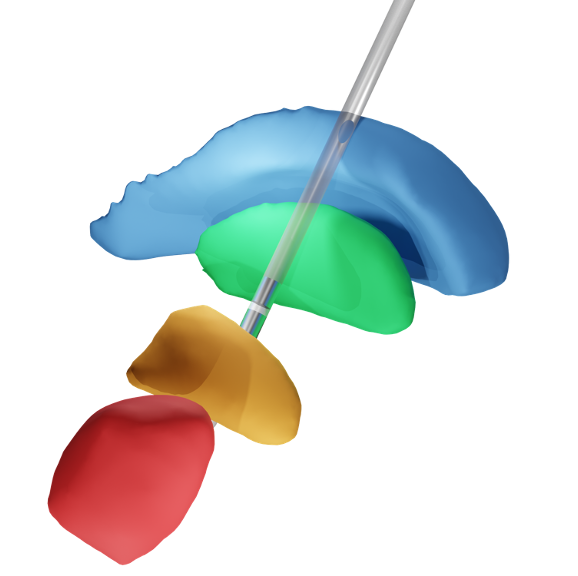
Use Blender’s camera and samples settings for print DPI; export PNG or EXR from the compositor when you need transparency or grading.
What stays in BrainDeer vs Blender
| In BrainDeer | In Blender |
|---|---|
| Interactive 2D ↔ 3D exploration | Final lighting, materials, depth of field |
| Atlas / ROI / Warpdrive workflows | Publication stills and turntable movies |
| Compose the clinical layout | BD_Camera paths (AI or by hand) — do not animate BD_FrameFix |
| Quick camera rigs for thinking | Cycles / EEVEE quality for sharing |
See also
- BrainDeer AI — Agent mode, the same commands as ⌘K
- Export & rendering — screenshots, OpenVDB notes, environment variables
- The 3D scene — VTK view, scene rig, Surface Studio
- Plugin catalog — BrainDeer × Blender at a glance
- Performance — keeping large volumes snappy while you compose